How We Connect Autodesk APS with Microsoft Azure: Secure CAD Ingestion, Conversion, Viewer Rendering, and Layer-Aware Copilot
Most teams talk about CAD "viewing" as if rendering is the hard part.
In production, rendering is only one stage. The real challenge is building a secure and reliable system that can:
- accept large CAD files from many sources,
- enforce identity and tenant boundaries,
- orchestrate Autodesk conversion jobs,
- render model data in the browser with low friction, and
- connect geometry and layers to business outcomes.
That is the architecture we use at Aginera.
This post is technical by design. It focuses on system boundaries, data flow, and operational decisions.
For historical context on Autodesk + Microsoft integrations, see the Microsoft announcement here: Announcing new integrations with Autodesk AutoCAD for Microsoft OneDrive and SharePoint.
End-to-end architecture at a glance
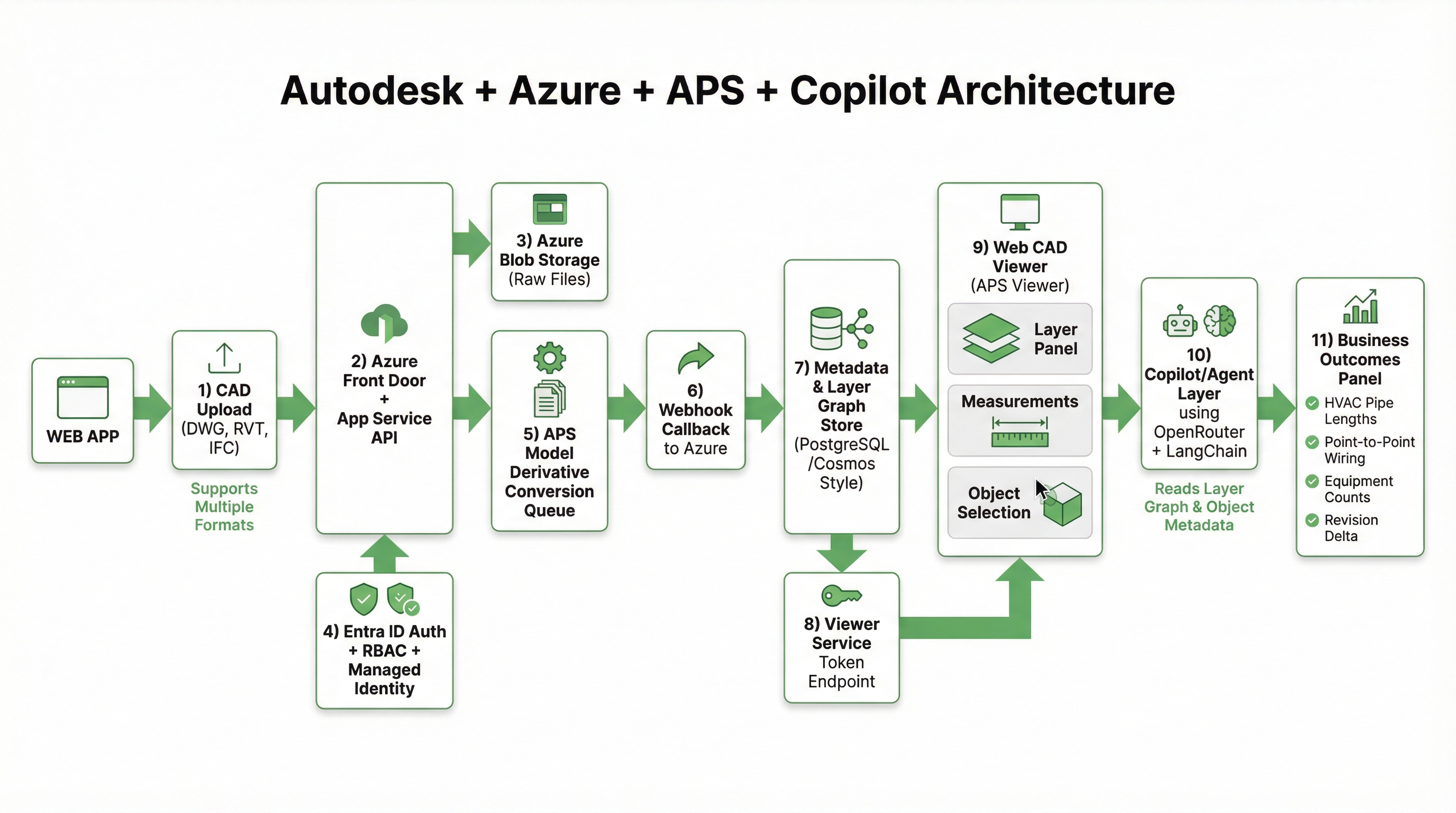
The architecture separates concerns into six layers:
- Upload/API edge
- Identity and access control
- Storage and conversion orchestration
- Metadata and layer graph
- Web viewer serving
- Copilot and outcome services
That separation is what lets us scale conversion throughput and keep security controls explicit.
1) CAD upload into Azure: the ingestion contract
Every CAD workflow starts with ingestion quality. If ingestion is loose, everything downstream becomes fragile.
At upload time, we enforce a contract:
- tenant context is required
- project/work package association is required
- source file hash is captured
- source revision metadata is captured
- file type is validated
Typical file paths include DWG, RVT exports, IFC, and plan-derived artifacts. Raw files land in Azure Blob Storage as immutable objects (versioned by design). We do not treat blob storage as a "folder share." It is the source of truth for the conversion pipeline.
At this stage we also emit an internal document event with:
tenantIdprojectIddocumentIdrevisionIdblobUrichecksumsourceMimeType
That event is the handoff boundary from upload to conversion.
2) Microsoft Entra ID security model: identity first, then compute
Security is not a wrapper around the pipeline. It is the pipeline.
We use Microsoft Entra ID (Azure AD) for identity, with tenant-aware access controls across API, storage access, and viewer token issuance.
Core controls
- OIDC-based sign-in and token validation at API edge
- RBAC mapped to estimator/reviewer/admin roles
- tenant isolation policy checks on every document-scoped action
- managed identity for service-to-service access (no embedded secrets in app code)
Why managed identity matters
The conversion pipeline touches multiple systems: Blob Storage, queueing, APS integration services, metadata store, and viewer token endpoints. Managed identities let us keep short-lived trust at runtime instead of static secrets spread across deployment surfaces.
The result is cleaner key hygiene and easier incident response.
3) APS integration: conversion as an asynchronous state machine
Autodesk Platform Services (APS) conversion is fundamentally asynchronous. A robust design treats it as a state machine, not a blocking API call.
Our state transitions are conceptually:
UPLOADED -> QUEUED_FOR_CONVERSION -> APS_SUBMITTED -> APS_PROCESSING -> APS_READY -> INDEXED_FOR_VIEWER
If conversion fails:
APS_FAILED -> RETRY_ELIGIBLE | MANUAL_REVIEW
Conversion orchestration pattern
- Queue worker reads upload event.
- Worker mints APS credentials (scoped and short-lived).
- Worker submits model derivative job to APS.
- APS callback/webhook notifies status changes.
- Callback handler writes job state and derivative references.
- Metadata indexing job extracts renderable model pointers + layer facts.
This approach gives us:
- predictable retries,
- explicit observability by state,
- zero need for long request timeouts in user-facing APIs.
4) Rendering in the web viewer: tokenized access + deterministic model fetch
Once derivatives are ready, the viewer flow is straightforward but strict:
- Browser requests viewer session for a specific
documentId/revisionId. - API re-checks Entra claims and tenant/project authorization.
- API issues short-lived viewer token.
- Viewer initializes APS runtime and loads derivative URN.
- Layer panel, object selection, and measurement tools bind to indexed metadata.
Here is an example screen from our in-product viewer workflow:
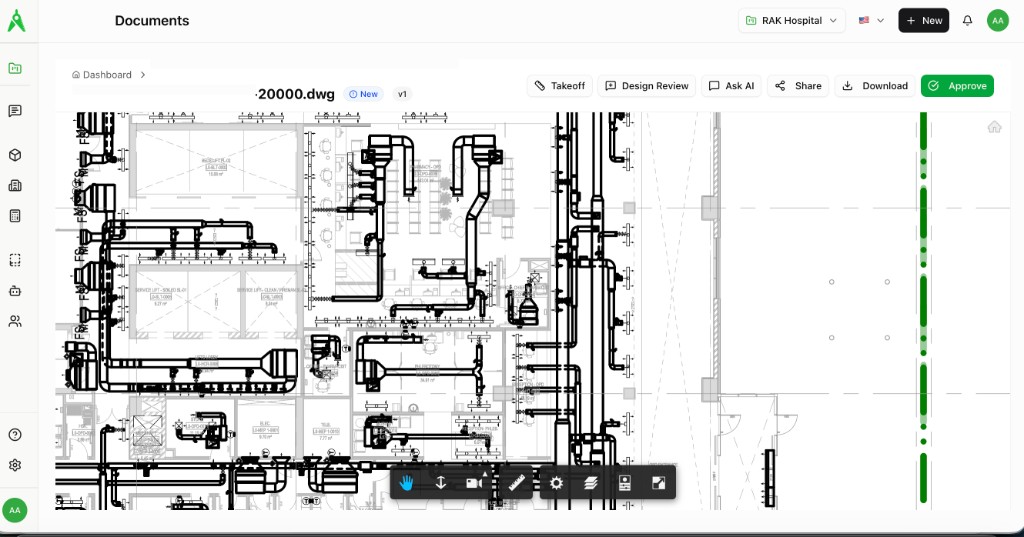
Two implementation details matter:
- Token TTL discipline: we keep viewer tokens short-lived and refresh through authorized endpoints only.
- Revision pinning: viewer sessions are pinned to a specific revision to avoid silent drift when addenda arrive.
That second point is essential for commercial workflows where quantity changes can alter bid risk.
5) Layer graph: from geometry to queryable engineering context
Rendering alone does not create estimating value. We need a layer and object graph that Copilot and downstream services can query.
After APS conversion, we materialize structured metadata such as:
- layer names and normalized layer classes
- object categories and families
- geometry-derived measures (length, count, area, etc.)
- sheet/model references
- revision lineage and delta markers
A simplified internal record shape looks like:
{
  "tenantId": "t-123",
  "projectId": "p-778",
  "revisionId": "r-042",
  "objectId": "obj-9f5a",
  "layer": "HVAC_Supply_Duct_Main",
  "discipline": "HVAC",
  "measurements": {
    "length_m": 18.42
  },
  "source": {
    "documentId": "doc-220",
    "viewRef": "model:level-2"
  },
  "confidence": 0.93
}
This is the bridge between CAD data and business logic.
6) Copilot that understands CAD layers, not just text prompts
Our Copilot is not a generic chatbot attached to documents. It uses layer graph context and object metadata to answer operations-level questions.
For example:
- "total HVAC supply pipe length by level and zone"
- "point-to-point wiring count from panel P2 to AHU control points"
- "objects added/removed between revision v3 and v4 for electrical containment"
The query path is:
Prompt -> Intent parser -> Layer/object retrieval -> Constraint checks -> Response synthesis with references
We keep responses grounded by including source references (document + layer + revision) so teams can audit why the answer was produced.
7) Business outcome mapping: what this architecture actually unlocks
This pipeline is useful only if it improves decisions.
HVAC use cases
- pipe and duct length rollups by system
- fitting density insights by zone
- revision deltas for change-order exposure
Electrical use cases
- point-to-point wiring summaries from diagram context
- conduit/tray segment quantification by route class
- panel-to-load relationship checks for estimate QA
Commercial use cases
- faster BOM population from structured CAD objects
- RFQ package enrichment with object-backed scope lines
- risk flags when revision deltas exceed expected thresholds
In short: the architecture turns a visual artifact into a computable scope graph.
8) Reliability patterns we consider non-negotiable
A technically correct demo is not enough. Production requires failure-aware design.
We enforce:
- idempotent conversion callbacks
- dead-letter handling for failed orchestration events
- per-tenant throughput controls
- audit logs for all token issuance and critical state transitions
- explicit human review surfaces for low-confidence extraction paths
These controls are the difference between "it works once" and "it works at operating scale."
9) Why Autodesk + Azure is a strong systems pairing
APS gives us mature model derivative and viewer tooling. Azure gives us enterprise identity, storage, and operational primitives.
Together they let us keep one coherent chain:
- secure CAD ingestion
- deterministic conversion orchestration
- browser rendering with governed access
- Copilot grounded in layer-aware engineering data
That chain is what enables measurable outcomes like HVAC pipe length extraction and point-to-point wiring intelligence without compromising security posture.
Closing
If you are building CAD intelligence systems, do not start from "how do we render faster?"
Start from:
- identity boundaries,
- revision truth,
- conversion state modeling,
- layer-aware metadata contracts,
- and auditability of every decision surface.
Rendering is the visible part. Decision-quality data is the product.


